Configure Jetson and Peripherals
Note
This section assumes that you have already completed Building the Car.
At the end of this section, you will have the NVIDIA Jetson NX and set up and connected to your computer via SSH and remote desktop.
- Required Equipment:
Fully built RoboRacer vehicle
Laptop/computer: Linux, Windows, Mac
External monitor/display
HDMI cable
Keyboard
Mouse
Wireless router
Ethernet cable (needed if Pit/Host laptop does not have WiFi capability)
Difficulty Level: Intermediate-Advanced
Approximate Time Investment: 2-3 hours
This Configure Jetson and Peripherals section will walk you through how to configure the NVIDIA Jetson NX so that you will be able to run programs on the RoboRacer Autonomous Vehicle System and communicate with the Vehicle from your laptop.
The image below represents the flow of information on the RoboRacer Autonomous Vehicle System.
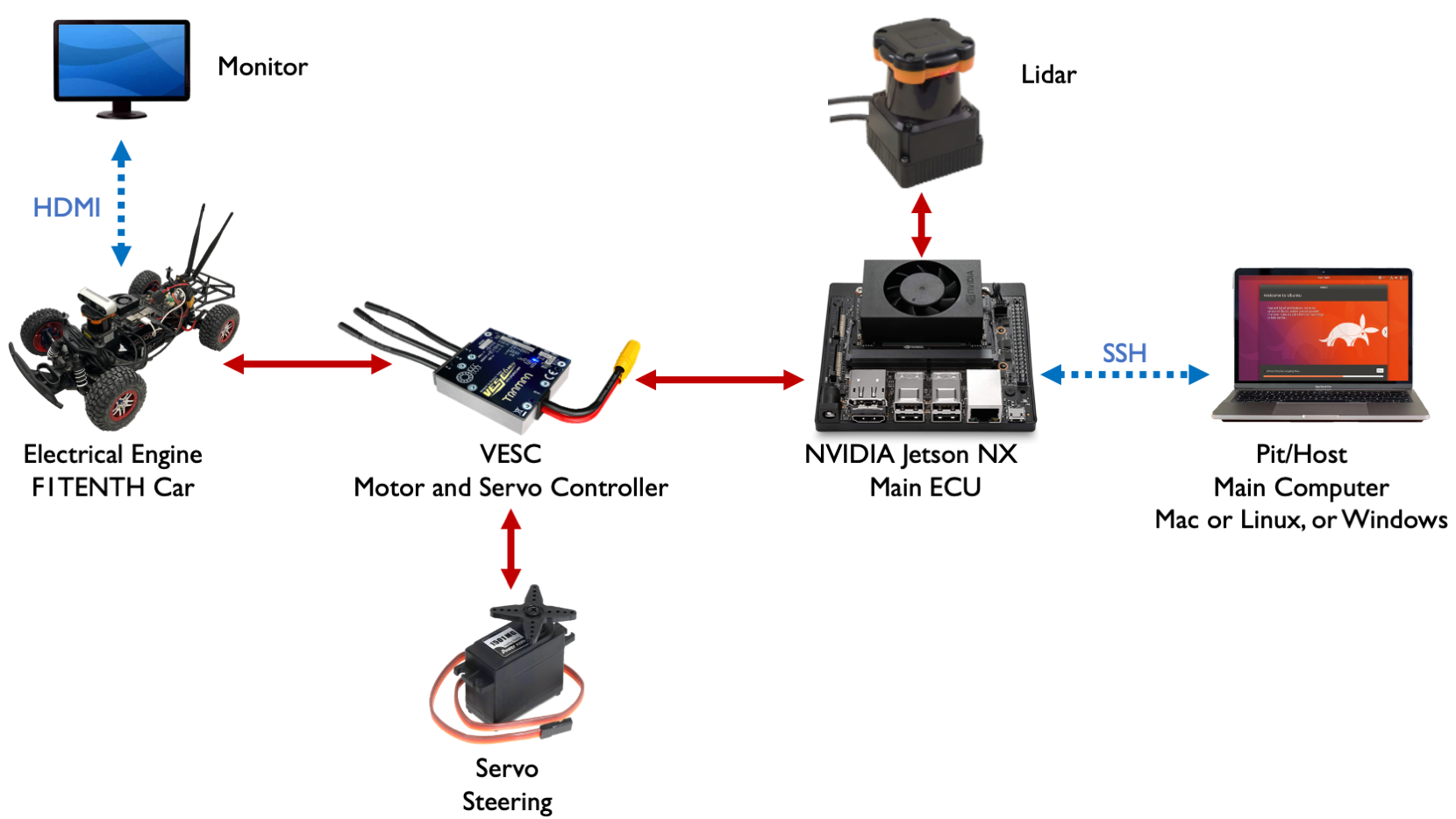
Flow of information on the RoboRacer Autonomous Vehicle System.
The NVIDIA Jetson NX is the main brain of the entire system. It gives commands to the VESC which controls the Servo and the Brushless Motor on the RoboRacer Vehicle. The NVIDIA Jetson NX also receives information from the LiDAR either via USB or Ethernet. All of these communication are done through ROS 2, we’ll go over how to set that up later on.
The Pit/Host laptop is your main computer that’s used to remotely access the onboard computer of the car. The operating system on this laptop doesn’t matter since we’re only using it for remote access via SSH or remote desktop. We’ll discuss how to use the simulator in a later section.
The configuration of the RoboRacer system has two subsections:
Configuring and Connecting to the NVIDIA Jetson NX walks you through flashing the NVIDIA Jetson Xavier NX, connecting it and your Pit/Host laptop to the same wireless network, and setting up SSH and remote desktop access.
DEPRECATED - Configuring the TX2 contains all necessary steps to configure the NVIDIA Jetson TX2. Note that we no longer support the TX2.
Tip
If you have any build and/or setup questions, post to the RoboRacer Slack.